Back

Aligning Cockpit Camera Pitch and Horizon in iRacing

Use the built-in camera editor in iRacing to align the horizon line with your physical eye level without distorting your field of view.

Aligning Cockpit Camera Pitch and Horizon in iRacing

Calculating an accurate field of view in iRacing is only half the battle when setting up a single ultrawide or triple-screen rig. If your physical eye level does not line up with the center of your monitors, the default cockpit camera leaves you feeling like you are staring uphill at the sky or downhill at the hood.

Using the Camera Tool Without Breaking Your Field of View

Many drivers try to fix a low or high seating position by tilting the camera pitch up or down with the keyboard shortcuts. Tilting orientation pitch alone bends vertical trackside reference points and makes elevation drops at circuits like Road Atlanta or Laguna Seca look unnatural. The proper adjustment combines Vanish Y and Orientation Pitch inside the iRacing camera editor so the horizon stays level with your eyes.
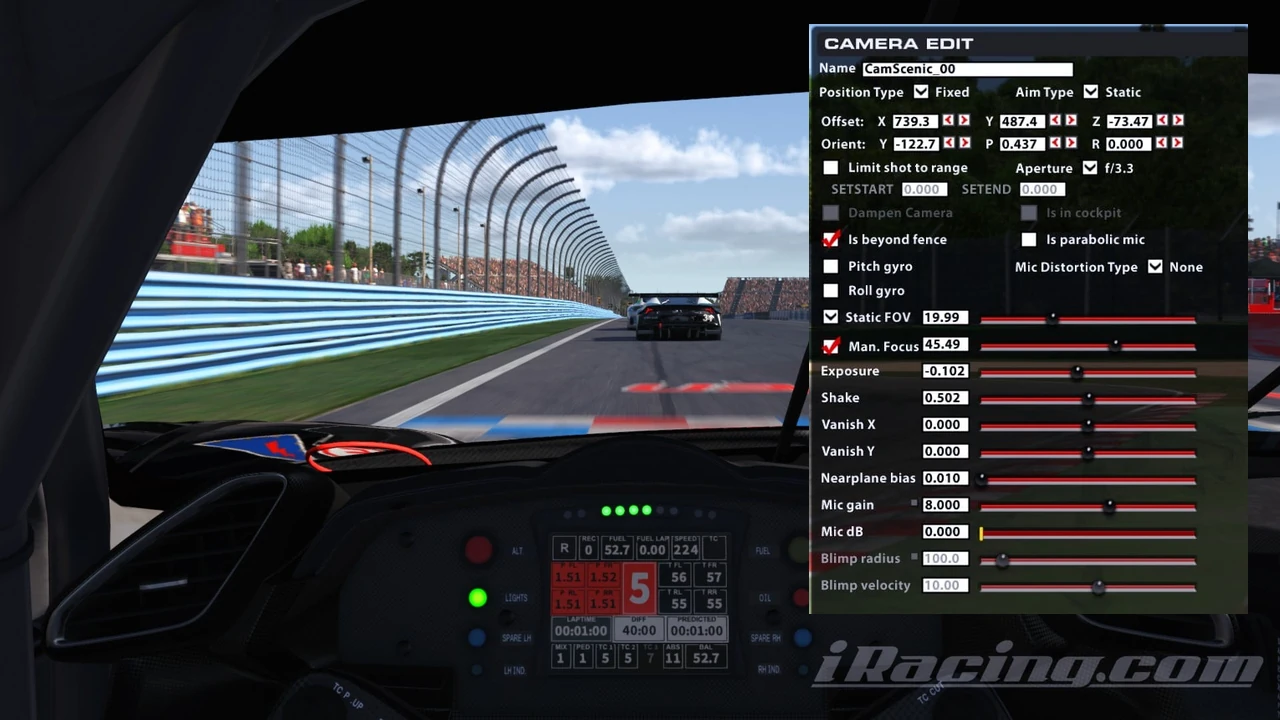
iRacing Ctrl+F12 Camera Edit menu in cockpit view showing Offset X/Y/Z, Orient P pitch, and Vanish Y horizon shift controls
iRacing

Common iRacing Cockpit Camera Questions Answered

How do I open the cockpit camera adjustment tool in iRacing?
Jump out of the car into the garage screen so the replay switches to the Cockpit camera view, then press Ctrl+F12 on your keyboard to bring up the built-in camera editor window.
When should I adjust Vanish Y instead of Orientation Pitch?
Measure the vertical distance from the bottom edge of your monitor to your eyes. If your eyes sit higher or lower than the vertical midpoint of the screen, shift Vanish Y first so the vanishing point matches your eye line, then tweak Orient P to bring the dashboard back into frame.
How do I save the camera position permanently for that car?
Click the Save Car button at the bottom of the Ctrl+F12 camera panel and leave the default camera.cam filename intact inside that car folder so iRacing loads your custom eye line every session.

Once your horizon line matches your physical posture, cresting blind hills and spotting late apex curbs feels natural right out of the pit lane. Instead of fighting visual distortion on steep downhill braking zones, your eyes track the road surface at the same angle you would experience sitting in a real bucket seat.

Quick Garage Tip

Hold a straight piece of tape across the vertical center of your monitor before measuring your seated eye height so you know whether to shift Vanish Y positive or negative.

Share This Story

Spread the word across the sim racing and motorsport community.

Partner Portal

Keeping your product hunt simple.

Check out our marketplace updated daily with over 7000 products. Explore Marketplace →