Back

Reading MoTeC Throttle Traces and Tire Slip Angles

A practical trackside guide to reading MoTeC brake pressure, throttle application, and tire slip angle channels to find lap time in any sim.

Reading MoTeC Throttle Traces and Tire Slip Angles

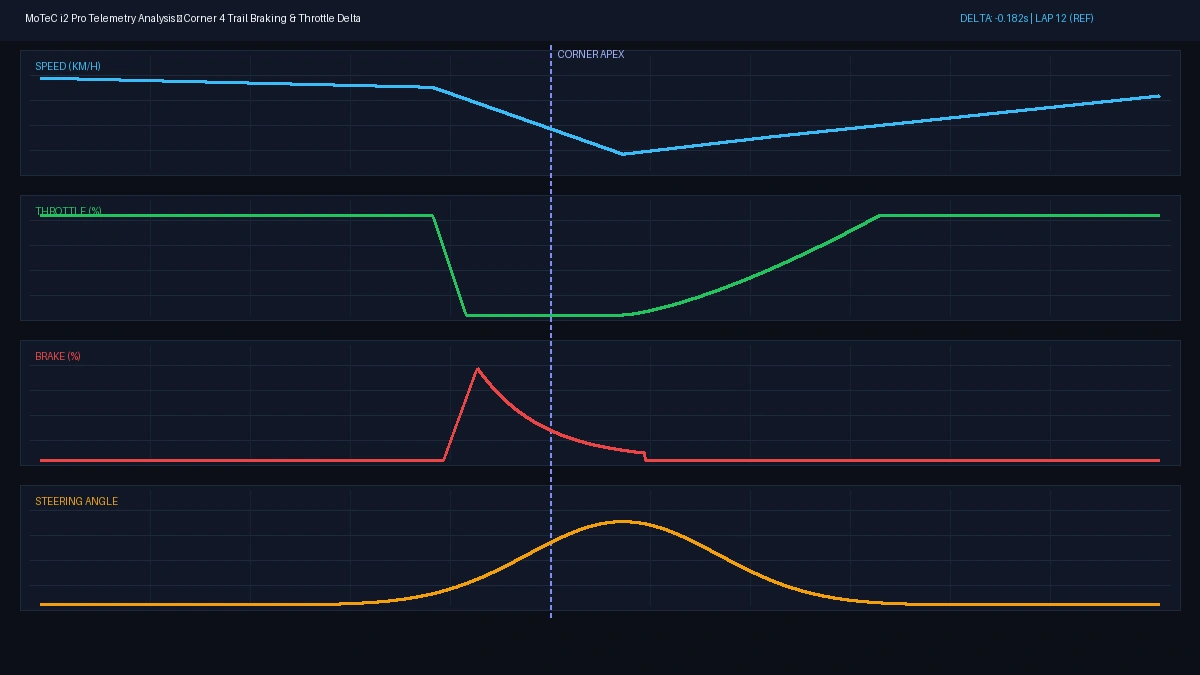
There’s nothing more soul-crushing then opening up MoTeC telem at midnight, only to stare at a squiggly red line that proves what your ego refused to admit: you’re braking thirty meters too early, and you’re afraid of the throttle on exit.

We’ve all been there, grinding out 50 practice laps in a row, hoping that somehow lap 51 will magically be half a second faster. News flash: more laps with bad habits just cements bad habits. The fastest sim racers don’t guess; they look at three simple channels to pinpoint exactly where they’re bleeding time.

The 3 Channels That Actually Matter
• 1. Brake Release Slope: Are you slamming the brake and dropping it to zero like a light switch? Look for a progressive, sloped trail down to the apex.
• 2. Throttle Hesitation: When you pick up the throttle, is it one smooth, confident stroke? If your trace looks like a staircase or shows nervous pumps, the car isn’t balanced.
• 3. Steering Angle vs. Speed: If your steering input keeps increasing through the center of the corner while speed drops, you’re just scrubbing front tires and cooking rubber.

Work One Corner At A Time

Don't try to fix the entire circuit in one session. Pick the two corners that lead onto the longest straights on the track, fix your throttle pickup commitment, and watch your delta bar turn green down the straight.
Share This Story

Spread the word across the sim racing and motorsport community.

Comments

Partner Portal

Keeping your product hunt simple.

Check out our marketplace updated daily with over 7000 products. Explore Marketplace →