


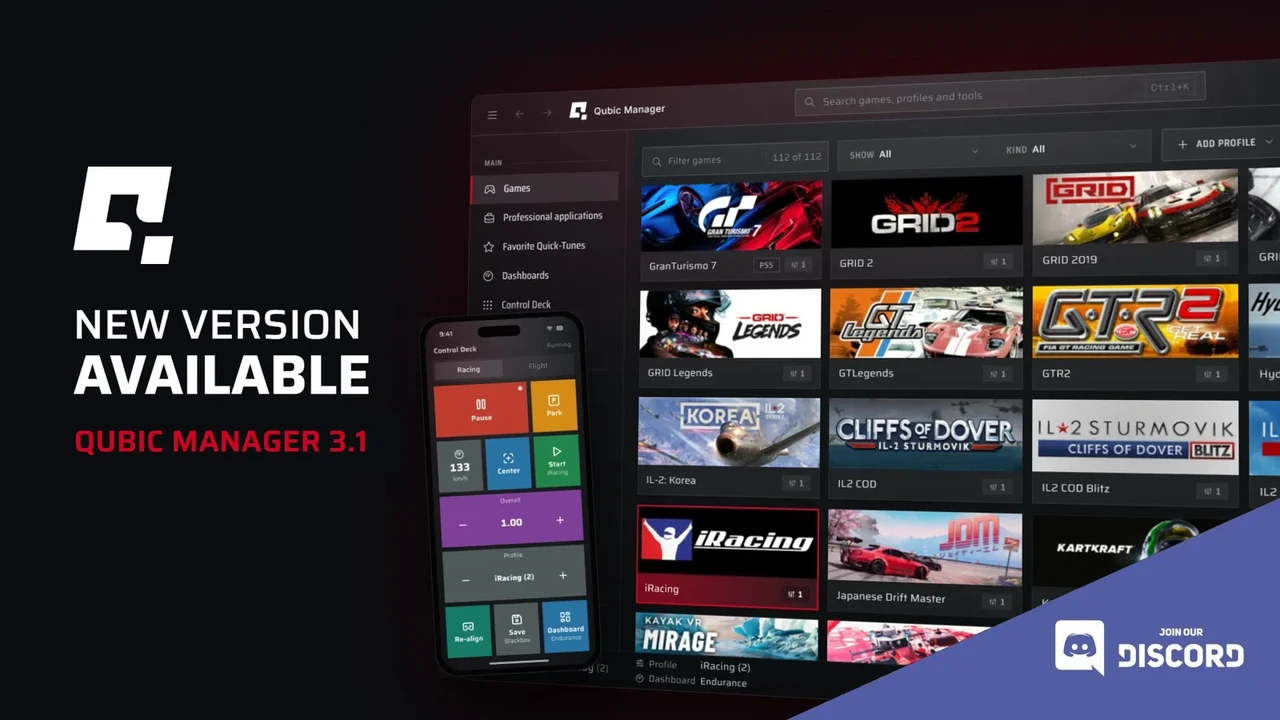
Qubic System released Qubic Manager 3.1 on November 25th, 2026 as a free update for every Qubic System motion platform and accessory. The company rebuilt every screen in the app so the same layout opens on your PC, tablet, or phone.
Underneath, the low-latency motion core stays the same, and your existing profiles, Quick-Tunes, favorites, and device settings carry over automatically. You also get dark, light, and high-contrast themes plus a Ctrl+K quick search bar to jump straight to any game, profile, setting, or tool.
Tune From Your Wheel or Phone
The biggest change for active drivers is that you don't have to reach for a mouse mid-session anymore. A new OSD menu opens directly over exclusive fullscreen games and inside any OpenXR or SteamVR headset, even if you aren't running VR HeadWay. You can adjust motion, belt, and haptic Quick-Tunes straight from three, four, or five wheel buttons, a gamepad, or a Stream Deck.
Outside the headset, the old Buttons page has been replaced by Control Deck. It gives you up to eight customizable tile pages on a paired phone, tablet, or desktop window to pause, park, center, swap profiles, or nudge Quick-Tunes, and it automatically switches between racing and flight pages when you launch a title. VR HeadWay also picks up one-press view alignment without moving the platform, automatic re-mapping for inside-out headsets, optional motion prediction, and removes the old iRacing input proxy that anti-cheat tools disliked.
Sharper Motion and Belt Feedback
Qubic Manager 3.1 also separates several effects that used to blend together on track:
- Split front and rear wheel frequencies: Wheel Forward Slip/Lock and Wheel Slip Angle now run independent front and rear frequencies on motion platforms, including 2DoF rigs, and on the QS-BT1 belt tensioner so front lock-ups and rear wheelspin feel distinct.
- Car-matched engine vibration: Built-in engine data for Assetto Corsa and Assetto Corsa EVO lets seat and QS-BT1 belt vibrations follow the car you're driving, from flat-sixes to V12s.
- Sim-specific updates: Assetto Corsa EVO plays curb and rumble hits on the specific corner that hit them and adds optional pit-box motion for engine starts. iRacing adds a new Bump Draft effect alongside driven-axle slip and ABS lock detection, while Rennsport adds motion platform support through shared memory.
- Gear surge and standing starts: 6DoF platforms, the QS-CH2, and the QS-TP1 add forward-and-back surge on gear shifts, plus an optional standing-start kick when you drop into first or reverse.
46 Rebuilt Dashboards and Rig Tools
All 46 built-in dashboards were rebuilt around live telemetry widgets with a drag-and-drop editor that renders the same across desktop windows, browsers, VoCore, and USBD480 screens. You can export or import custom dashboard files and drop in new widgets like an engine map readout for Assetto Corsa Competizione, Assetto Corsa EVO, RaceRoom, Le Mans Ultimate, F1, and iRacing.
On the utility side, version 3.1 adds one-file Backup and Restore, a simpler Platform Test tool with per-axis manual sliders, a Benchmark mode that measures telemetry-to-motion latency on a recorded lap, and Kiosk mode to lock settings on public or shared rigs. DIY Tactile Feedback gets roughly 45% lower latency than version 2.191 and another 65% drop with the new Exclusive use option, while an optional opt-in MCP server lets local AI tools like Claude Code or Cursor read rig status or adjust Quick-Tunes.
What to Know Before Updating
Because the interface and dashboard system changed so much, a few items don't carry over from version 2.x. Dashboards saved in earlier versions won't load, the Buttons page is gone in favor of Control Deck, and older joystick mappings need to be rebuilt on the new Joystick mapping page.
Le Mans Ultimate profiles and dashboards now bind to the car model rather than the team entry, copied Rennsport profiles need to be copied again, and paired phones or tablets now connect with a one-time pairing code instead of a password. Windows 10 and 11 users also need the Microsoft Edge WebView2 runtime installed. Before grabbing the installer from the Qubic System download page, make sure you save a Backup & Restore file first.







Comments